
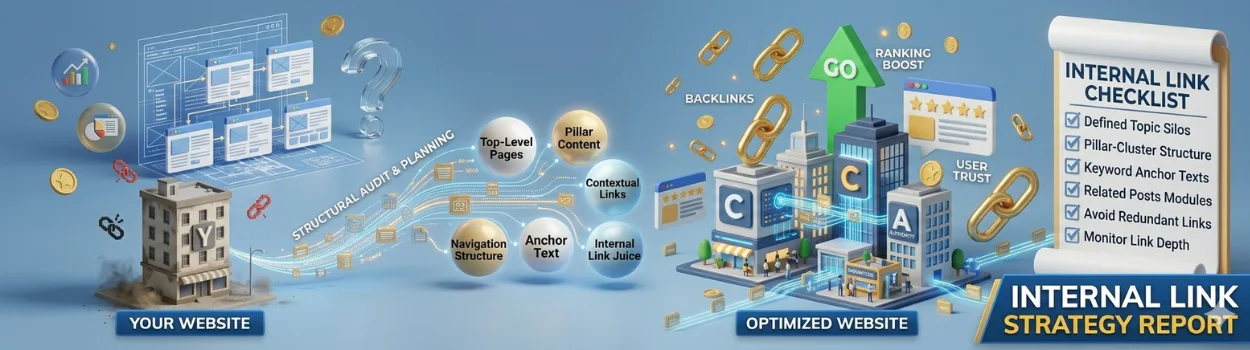
You’ve invested in a website. Maybe you’ve even spent money on SEO, blogs, or ads. But despite all the effort, your business still struggles to generate consistent leads and conversions.
Sound familiar?
The problem often isn’t your services or products — it’s your website structure.
Many small businesses and startups focus only on keywords and backlinks while ignoring one of the most powerful SEO tactics: Internal Linking Strategy.
A strong Internal Linking Strategy helps search engines understand your website, improves user experience, increases page authority, and keeps visitors engaged longer. In simple words, it turns your website into an organized, conversion-focused machine.
If your website feels messy, pages are disconnected, or important services aren’t ranking on Google, this guide will help you build an SEO-Friendly Website Structure that actually drives traffic and sales.
What Is an Internal Linking Strategy?
An Internal Linking Strategy is the process of connecting pages within your own website using hyperlinks.
For example:
- Your homepage links to your services page
- Your blog links to your SEO service page
- Related blogs connect with each other
- Service pages link to case studies or contact pages
These links help:
- Google crawl your website better
- Users navigate easily
- Important pages gain authority
- Visitors stay longer on your site
- Conversion opportunities increase
Think of internal links as roads connecting different parts of your business online.
Without proper roads, users and search engines get lost.
Why Small Businesses Need an SEO-Friendly Website Structure
Many business owners unknowingly create websites with poor navigation and disconnected pages.
This creates major problems like:
- Low Google rankings
- High bounce rates
- Poor user experience
- Low page authority
- Fewer inquiries and leads
- Wasted marketing budget
An SEO-Friendly Website Structure solves these issues by organizing your content logically.
Google loves websites that are easy to understand.
Your visitors do too.
Benefits of a Strong Internal Linking Strategy
1. Improves Google Rankings
Internal links help distribute authority across your website.
When high-performing pages link to important service pages, Google sees those pages as more valuable.
This improves keyword rankings over time.
2. Helps Search Engines Crawl Faster
Google bots discover pages through links.
If pages are isolated without internal links, they may never rank properly.
A well-planned SEO-Friendly Website Structure ensures every page gets indexed efficiently.
3. Keeps Visitors on Your Website Longer
When users find relevant content through internal links, they continue exploring your website instead of leaving.
This reduces bounce rate and improves engagement metrics.
4. Increases Conversions
Strategic internal links guide users toward action.
For example:
- Blog → Service Page
- Service Page → Case Study
- Case Study → Contact Form
This creates a natural customer journey.
How to Build an SEO-Friendly Website Structure
Step 1: Create a Clear Website Hierarchy
Your website structure should look simple and organized.
Example Structure:
- Homepage
- Services
- SEO Services
- Web Design
- Digital Marketing
- Blogs
- SEO Blogs
- Marketing Tips
- About
- Contact
- Services
This helps Google understand content relationships.
Step 2: Use Topic Clusters
Topic clusters are groups of related content linked together.
Example:
Main Page:
- Digital Marketing Services
Supporting Blogs:
- SEO Tips
- Local SEO Guide
- Google Ads Strategy
- Social Media Marketing Tips
All blogs internally link back to the main service page.
This builds topical authority.
Step 3: Link High-Traffic Pages to Conversion Pages
Check which blogs get the most traffic.
Now strategically link them to:
- Service pages
- Consultation pages
- Audit forms
- Contact pages
This turns informational traffic into business leads.
Step 4: Use Keyword-Rich Anchor Text
Anchor text tells Google what the linked page is about.
Instead of:
- “Read this article”
Use:
- “Learn how an Internal Linking Strategy improves SEO”
This strengthens keyword relevance.
Step 5: Add Contextual Links Naturally
The best internal links appear naturally inside content.
Example:
“If your website has poor navigation, building an SEO-Friendly Website Structure can significantly improve rankings and user engagement.”
This feels natural and improves readability.
Internal Linking Strategy for Local Businesses
If you run a local business, internal linking becomes even more powerful.
Example:
- Homepage → “SEO Services in Pune”
That page links to:
- Local SEO Guide
- Website Design Services
- Google Ads Services
- Contact Page
This strengthens local SEO relevance.
How Internal Linking Impacts ROI
Most business owners focus only on traffic.
But traffic without structure rarely converts.
An effective Internal Linking Strategy helps:
- Improve lead generation
- Increase inquiry rates
- Reduce ad dependency
- Improve organic conversions
- Build long-term SEO growth
This means better ROI from your website and marketing efforts.
Signs Your Website Needs Better Internal Linking
You likely need an improved SEO-Friendly Website Structure if:
- Important pages don’t rank
- Visitors leave quickly
- Blogs get traffic but no inquiries
- Google indexes pages slowly
- Users struggle to navigate
- Service pages have low authority
These are common problems for growing businesses.
The good news?
They’re fixable.
Final Thoughts
A beautiful website alone won’t generate leads.
Without a smart Internal Linking Strategy, your website becomes difficult for both users and Google to understand.
An optimized SEO-Friendly Website Structure creates:
- Better rankings
- More traffic
- Higher engagement
- Increased conversions
- Stronger brand authority
For startups and small businesses, this can be the difference between struggling online and generating consistent leads every month.
The best part?
You don’t always need more traffic.
Sometimes, you simply need a smarter website structure.

